Windows Phone 7 Could Bring A New Look To The Smartphone Show
Windows Phone 7: A Bold Reshaping of the Smartphone Landscape
The smartphone market, at the dawn of the 2010s, was a bifurcated entity. Apple’s iOS, with its elegant simplicity and app-centric ecosystem, and Google’s Android, a rapidly evolving open-source challenger, commanded the lion’s share of attention and market penetration. Into this established duopoly, Microsoft’s Windows Phone 7 arrived not with a whisper, but with a thunderous declaration of intent, seeking to inject a radical new aesthetic and user experience into a world increasingly saturated with familiar grid-like interfaces. This wasn’t a mere iteration; it was a deliberate departure, a strategic gamble to redefine what a smartphone interface could be, and in doing so, offered a compelling alternative for consumers seeking something fresh, visually distinctive, and operationally unique. The core of its appeal lay in its audacious "Metro" design language, a stark contrast to the skeuomorphism and icon-heavy layouts prevalent at the time.
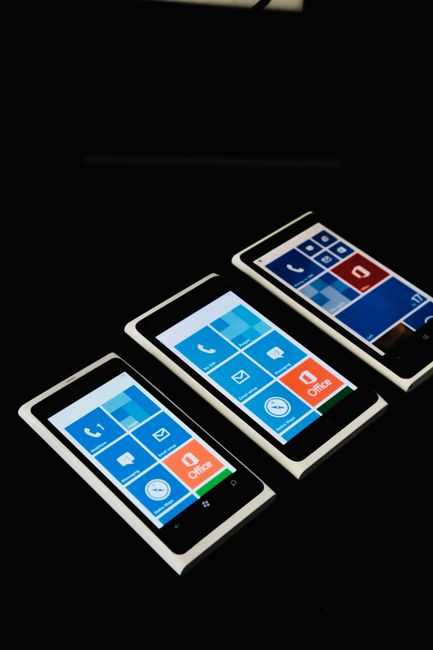
The Metro design, later renamed "Modern UI," was fundamentally built around typography, fluid animations, and a minimalist approach. Gone were the crowded home screens filled with dozens of small icons. Instead, Windows Phone 7 introduced "Live Tiles." These weren’t static placeholders; they were dynamic, information-rich widgets that could display snippets of data directly on the home screen. A contact’s picture could expand to show their latest social media update, a calendar tile could display upcoming appointments, and a news tile could scroll through headlines. This proactive information delivery was a significant departure from the app-first paradigm of its competitors. Users were no longer required to open an application to ascertain its core function or status. Instead, the OS pushed relevant information to them, fostering a more glanceable and efficient interaction model. This was a conscious effort to move away from the "app silo" experience, where information was often locked within individual applications, encouraging a more holistic and integrated view of the device’s capabilities.
The navigational structure of Windows Phone 7 was equally groundbreaking. The primary navigation elements were typically located at the bottom of the screen: a dedicated "Back" button, the Windows start button, and a search button. This consistent placement across the operating system created a predictable and intuitive flow. Within applications, a common pattern emerged: a pivot control at the top allowed users to switch between different sections or views of the app. This hub-and-spoke model, combined with the fluid transitions and animations, created a sense of seamless movement between different pieces of content and functionality. The emphasis on gestures and swipes, coupled with the clear visual hierarchy provided by the large, legible typography, contributed to a user experience that felt both modern and remarkably intuitive, even for those accustomed to different mobile operating systems.
Beyond the aesthetic and navigational shifts, Windows Phone 7 also championed a distinct approach to content and social integration. The "People Hub" was a prime example. It aggregated contacts from various social networks, email accounts, and the phone’s address book, presenting a unified view of one’s social circle. Updates from Facebook, Twitter, and LinkedIn could be seen directly within the People Hub, and users could easily post updates or initiate calls and messages from a contact’s profile. This was a powerful statement about the centrality of social connections in the smartphone experience, aiming to make managing those connections a core, integrated function of the OS, rather than an add-on feature. Similarly, the "Photos Hub" brought together pictures from the camera roll, Facebook, and other linked services, offering a centralized repository for visual memories. This integrated approach was designed to reduce friction and simplify the way users interacted with their digital lives.
The search functionality on Windows Phone 7 was also a notable differentiator. Unlike the app-centric search of its rivals, Windows Phone 7’s search button initiated a more context-aware search. Depending on the screen the user was on, the search could focus on contacts, applications, web results, or local business listings. This intelligent contextuality meant that the search function was always poised to provide the most relevant results, reducing the need for users to specify the type of search they intended to perform. This was a subtle but significant enhancement, contributing to the overall efficiency and perceived intelligence of the operating system.
Microsoft’s strategy with Windows Phone 7 also involved a strong emphasis on hardware partnerships. While Apple maintained tight control over its hardware and Google’s Android benefited from a wide range of manufacturers, Microsoft initially focused on a more curated selection of hardware partners. This allowed for a more consistent experience across devices, as Microsoft could work closely with manufacturers to ensure their hardware met the stringent design and performance requirements of Windows Phone 7. This approach aimed to deliver a premium and reliable user experience, avoiding the fragmentation and performance inconsistencies that could sometimes plague open platforms. This controlled ecosystem was intended to build brand trust and deliver a more polished product from the outset.
The developer ecosystem, crucial for any smartphone platform, was initially a point of contention for Windows Phone 7. Unlike the mature iOS and Android app stores, the Windows Phone Marketplace was a work in progress. Microsoft invested heavily in attracting developers, offering incentives and robust development tools. While the initial app selection was limited, the platform’s unique design and functionality presented new creative opportunities for developers. The XNA framework, commonly used for Xbox game development, was also leveraged for Windows Phone 7 app development, attracting a community of game developers. The platform’s open nature regarding certain aspects of development, while still maintaining a curated app store, offered a middle ground that appealed to some developers.
Windows Phone 7 also represented a significant shift in Microsoft’s mobile strategy. For years, Windows Mobile had been a dominant force in the enterprise and PDA market, but it struggled to gain traction in the consumer smartphone space. Windows Phone 7 was a complete rebranding and reimagining of Microsoft’s mobile ambitions. It was a clear signal that Microsoft was willing to shed its legacy and embrace a fresh, modern approach to mobile computing. This was a bold move, demonstrating a commitment to innovation and a desire to recapture relevance in a rapidly evolving market. The emphasis on design and user experience over sheer technical specifications was a testament to this new direction.
The impact of Windows Phone 7 on the broader smartphone industry cannot be overstated, even if its market share ultimately fell short of its ambitions. Its Live Tiles fundamentally influenced how information is presented on mobile devices, with elements of its glanceable, information-rich approach being adopted or emulated by competitors. The emphasis on typography and minimalist design challenged the prevailing aesthetics and encouraged a more thoughtful approach to user interface design across the board. Furthermore, the platform’s commitment to a consistent, high-quality user experience, regardless of the underlying hardware, set a benchmark that other manufacturers and operating systems strived to meet. It pushed the envelope on what was considered intuitive and efficient in mobile navigation and interaction.
While Windows Phone 7 ultimately did not achieve the widespread adoption that Microsoft had hoped for, its legacy is undeniable. It served as a vital third force, a disruptive innovator that injected much-needed creativity and diversity into the smartphone landscape. Its bold design language, unique interface paradigms, and integrated social features pushed the boundaries of what was possible and inspired a generation of mobile experiences. For a period, it offered a compelling and visually arresting alternative, proving that a smartphone interface could be both functional and a work of art, a testament to Microsoft’s willingness to take risks and redefine conventions in the pursuit of a new mobile paradigm. It was a glimpse into a different future for mobile, one that prioritized information at a glance and fluid, gestural interaction, leaving an indelible mark on the evolution of smartphone design and usability.