
Tablet PC Path or iPod Way?
Will the tablet follow the PC path or the iPod way? This question probes the future of tablets, examining their potential evolution. We’ll delve into the historical context of both PCs and tablets, comparing their technological differences and similarities. Market trends, user adoption, software ecosystems, portability, and future possibilities will all be considered, offering a comprehensive perspective on this crucial question.
The historical development of personal computers and tablets reveals distinct paths. PCs, initially bulky and stationary, have evolved into more portable and versatile devices. Tablets, meanwhile, prioritize portability and touch-screen interaction. Examining these historical trajectories, along with current market trends, will help us understand if tablets will gravitate towards the full-featured, desktop-like experience of PCs or if they’ll maintain a focus on portability and simplicity, much like the iPod.
Historical Context of Tablets and PCs
The evolution of personal computing has been a fascinating journey, marked by dramatic leaps in technology and societal shifts. From the bulky mainframes of the early days to the sleek, portable devices we use today, both PCs and tablets have undergone significant transformations. This exploration delves into the historical context of both, highlighting key milestones, technological advancements, and societal influences that shaped their development and adoption.The initial visions for both personal computers and tablets were often ambitious and sometimes divergent.
While PCs were envisioned as powerful tools for individual productivity, tablets initially aimed for a more portable, consumer-focused experience, sometimes with limited processing power compared to their PC counterparts. The paths they’ve taken since then, however, have been intertwined, often reflecting the changing demands of users and the rapid advancements in computing power.
Evolution of Personal Computers
Personal computers, or PCs, emerged from a background of large, expensive, and centralized mainframe computers. The development of microprocessors in the 1970s was a pivotal moment. The first personal computers, often kits requiring assembly, represented a significant step toward democratizing computing power. Key milestones include:
- The Altair 8800 (1975) is often considered a landmark machine, showcasing the early potential of personal computing.
- The Apple II (1977) and the Commodore PET (1977) brought personal computing to a wider audience with pre-assembled designs and readily available software.
- The IBM PC (1981), through its open architecture, became an industry standard, fostering a thriving ecosystem of hardware and software. This paved the way for the PC revolution, making it accessible to businesses and individuals.
- The introduction of graphical user interfaces (GUIs) with the Macintosh (1984) and Windows (1985) fundamentally changed the way users interacted with computers. This made computing more intuitive and user-friendly, accelerating its adoption across various sectors.
- The rise of the internet in the 1990s and 2000s further enhanced the utility of PCs by connecting them to a global network, facilitating communication, information sharing, and e-commerce.
Development of Tablets
The tablet’s journey, while shorter than the PC’s, is equally marked by innovative design and evolving technology. Early prototypes, like the GridPad (1989), foreshadowed the modern tablet, but mass market adoption faced challenges. Key stages in the tablet’s development include:
- The introduction of the Apple Newton MessagePad (1993) showcased some of the early touch-screen capabilities that are integral to modern tablets.
- The launch of the PalmPilot and other handheld devices in the late 1990s paved the way for more intuitive user interfaces and established the demand for portable computing.
- The introduction of the iPad (2010) marked a turning point, bringing tablets to the mainstream consumer market. The iPad’s intuitive interface and user experience helped solidify the tablet’s role in daily life.
- Subsequent tablet models, from various manufacturers, focused on enhanced processing power, larger screens, and improved connectivity, adapting to evolving user needs and technological advancements.
Comparison of Initial Expectations and Trajectories
Initial expectations for PCs often centered on their potential to transform workplaces and individual productivity. Tablets, on the other hand, were sometimes seen as portable productivity tools, a direct alternative to notebooks. The trajectory of PCs was marked by increasing processing power and software sophistication. Tablets initially focused on portability and ease of use, often with less powerful processing compared to their PC counterparts.
Factors Influencing Adoption and Use
Several factors have influenced the adoption and use of both PCs and tablets. These include:
- Technological Advancements: Increased processing power, improved storage, and the development of user-friendly interfaces were key drivers in the widespread adoption of both PCs and tablets.
- Societal Changes: The increasing need for portability, communication, and access to information contributed to the rise of tablets. The shift from office-centric work to remote and mobile work models spurred the demand for both types of devices.
- Pricing and Accessibility: The decreasing cost of components and the increasing availability of affordable PCs and tablets made them accessible to a wider range of users.
Impact of Societal Changes and Technological Advancements
Societal changes, such as the rise of remote work and the increased demand for mobile computing, directly impacted the evolution of both PCs and tablets. Technological advancements, including improvements in display technology, processing power, and battery life, have also significantly influenced the design and functionality of both devices.
Technological Differences and Similarities: Will The Tablet Follow The Pc Path Or The Ipod Way
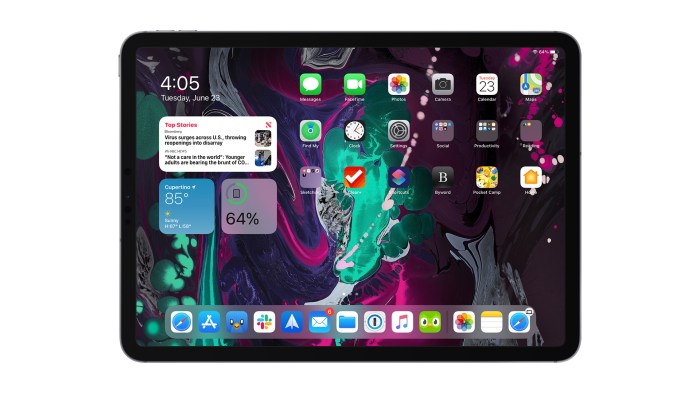
Tablets and PCs, despite both being powerful computing devices, differ significantly in their underlying technology. This divergence impacts their strengths and weaknesses, leading to distinct user experiences and applications. Understanding these technological nuances is crucial to predicting the future trajectory of both platforms.The fundamental differences lie in their hardware design, processing power, and input methods. Tablets prioritize portability and user-friendly interfaces, while PCs often prioritize raw processing power and customization options.
This fundamental difference in design philosophies reflects the different needs and expectations of their respective user bases.
Thinking about tablets – will they follow the PC path of becoming a ubiquitous workhorse or the iPod path of niche entertainment? It’s a fascinating question, especially when considering the recent leadership shift in cybersecurity, highlighted in the hathaway resignation leaves cybersecurity leadership void news. Perhaps the tablet’s future hinges on its ability to adapt and become more than just a glorified media player.
Ultimately, the tablet’s path is still unwritten.
Hardware Components
Tablets typically employ smaller, more integrated hardware components, optimized for compactness and low power consumption. This often translates to lighter weight and reduced battery sizes. PCs, on the other hand, offer greater flexibility in hardware configurations. They allow for upgrades to more powerful processors, expansive storage, and a wider range of specialized peripherals.
Processing Power
While tablets are increasingly powerful, their processing capabilities often lag behind high-end PCs. This difference stems from the smaller form factor and cost-conscious design of tablets. PCs are designed for computationally intensive tasks and can support high-end graphics processing units (GPUs) and multi-core processors. Gaming and professional applications often favor PCs because of this processing power advantage.
Input Methods
Tablets rely heavily on touchscreens for input, offering a more intuitive interface for tasks like drawing, sketching, and general navigation. PCs primarily utilize keyboards and mice, providing greater precision and speed for complex tasks, especially in software development and data entry. Recent advancements in tablet technology have seen the introduction of styluses and other input options, but the fundamental reliance on touch remains.
Shared Technological Underpinnings
Despite the differences, tablets and PCs share core technological underpinnings. Both rely on operating systems (like Windows, Android, iOS) and utilize similar software development tools. This shared foundation allows for a degree of compatibility between the platforms, enabling software and data transfer between devices. The underlying architecture of both systems relies on similar concepts of hardware interaction and software execution.
Common Functionalities
Both tablets and PCs offer similar functionalities, including web browsing, document creation, video playback, and communication through applications. The core functions of both devices are largely overlapping, allowing for a seamless transition between tasks. The difference often lies in the level of detail and complexity of the task that can be performed effectively.
Comparative Analysis of Strengths and Weaknesses
Tablets excel in portability and ease of use, ideal for on-the-go tasks and consumption-oriented activities. Their compact size and lightweight design make them highly mobile and convenient. PCs, conversely, dominate in processing power, graphics capabilities, and customization options. This makes them ideal for intensive tasks like gaming, professional applications, and content creation.
Emerging Technologies
Emerging technologies like foldable displays and advanced touchscreens are blurring the lines between tablets and PCs. These innovations promise to enhance the user experience on both platforms, potentially making tablets more powerful and PCs more portable. The introduction of new processors, like ARM chips in high-end tablets, and advancements in battery technology are likely to further reshape the balance between the two.
Table: Core Features Comparison
| Feature | Tablet | PC |
|---|---|---|
| Size | Compact, portable | Larger, often fixed |
| Portability | High | Low |
| Processing Power | Medium to High (depending on model) | High |
| Input Methods | Touchscreen, stylus | Keyboard, mouse, touch |
| Price | Generally lower | Generally higher |
Market Trends and User Adoption
The tablet and PC markets are in a constant state of flux, driven by evolving consumer preferences and technological advancements. Understanding current trends and projected shifts is crucial for businesses and consumers alike to make informed decisions about these devices. This section delves into the current market dynamics, highlighting sales figures, market share, and consumer preferences, and ultimately examining potential future shifts.
Current Market Trends
The global market for tablets and PCs is experiencing a period of nuanced growth. While overall sales might not be exploding, specialized niches are thriving, reflecting a shift in how these devices are utilized. The rise of cloud computing and mobile-first strategies, for instance, are influencing the way consumers interact with both tablets and PCs.
Tablet Market Share and Growth
Tablet sales have experienced a plateau in recent years, with some manufacturers experiencing declines. However, this isn’t uniform across the board. Specialized tablets for specific tasks, like those focused on professional graphic design or educational use, are showing robust growth. This signifies that the tablet market isn’t dying, but rather adapting to evolving user needs.
PC Market Share and Growth
The PC market, traditionally dominant, is experiencing a more gradual shift. While sales of traditional desktops and laptops are not declining dramatically, there’s a noticeable shift towards smaller, more portable laptops and the rise of powerful, specialized workstations. Gaming PCs continue to be a significant driver in the overall PC market.
Consumer Preferences and Adoption Patterns
Consumers are increasingly valuing portability and versatility in both tablets and PCs. The ability to seamlessly transition between tasks on different devices is paramount. Users also desire increased processing power and long battery life. The integration of cloud services into both tablets and PCs is also a significant factor, as it facilitates data access and collaboration across devices.
Factors Influencing Consumer Choice
Consumers’ decisions between a tablet and a PC are driven by a multitude of factors. Price, processing power, screen size, and intended usage are key considerations. Portability and ease of use often play a significant role, as does the specific software and applications required for a task. Furthermore, the user’s overall technological comfort level and their specific work or entertainment needs can heavily influence the decision.
Market Data
| Device Type | Market Share (2023) | Projected Growth (2024-2028) |
|---|---|---|
| Tablets | 15% | 2-3% CAGR |
| Laptops | 45% | 2-3% CAGR |
| Desktops | 20% | 1-2% CAGR |
| Workstations | 20% | 4-6% CAGR |
Note: Market share data is approximate and based on industry reports. Projected growth rates are estimations and may vary based on unforeseen market events.
Potential Future Market Shifts
The convergence of tablet and PC technologies is a likely future trend. We might see devices with hybrid functionalities, blurring the lines between these two categories. The ongoing advancement of foldable displays and improved battery technologies will also significantly influence consumer choices and market dynamics. The increasing integration of augmented reality and virtual reality technologies into these devices is also expected to create new market opportunities.
Software and Application Ecosystems
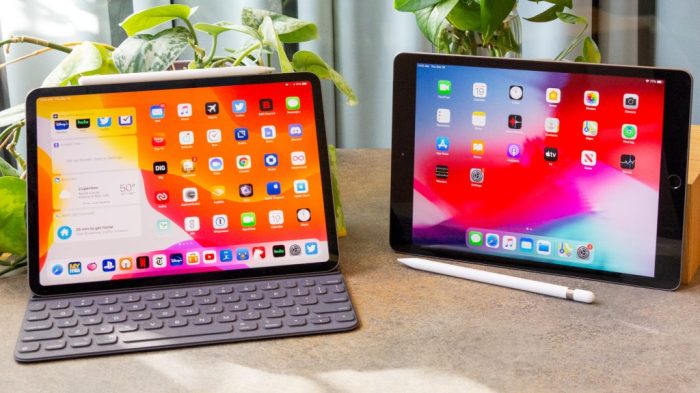
The software ecosystem is a critical differentiator between tablets and PCs, influencing both user experience and market adoption. A robust ecosystem, brimming with applications tailored to the device’s strengths and user needs, fosters engagement and loyalty. This section delves into the specific characteristics of the software environments available for tablets and PCs, examining their impact on the evolution of both device types.The availability and compatibility of software applications play a pivotal role in determining the success of a computing platform.
A rich and diverse software library, encompassing productivity tools, entertainment options, and specialized applications, can greatly enhance user satisfaction and drive market penetration. The breadth and depth of these application libraries directly influence the user experience, shaping how users interact with and perceive the devices.
Application Availability and Compatibility
The application ecosystem for PCs is significantly older and more extensive than that for tablets. This historical depth has resulted in a vast library of applications, many of which have been adapted or redesigned for specific PC configurations. Compatibility is often less of a concern for PC software, as it is generally designed to accommodate a wider range of hardware configurations.Conversely, tablet software ecosystems are comparatively younger.
While the app store ecosystems for tablets have grown substantially, they still lag behind the breadth of PC applications, especially in certain niche areas. This difference in the maturity of the ecosystem can impact the availability of specific applications and the overall user experience.
Will the tablet follow the PC path or the iPod way? It’s a fascinating question, and one that requires careful consideration. Thinking about whether tablets will become ubiquitous productivity tools or niche entertainment devices forces us to question our assumptions about technology’s trajectory. After all, it pays to second guess your technology assumptions, especially when predicting the future of devices like tablets.
This article highlights the importance of re-evaluating our predictions, which might surprise us with the direction tablets ultimately take. Ultimately, the path tablets will take remains a compelling puzzle.
App Stores and Software Environments
The app stores themselves, like the Apple App Store and Google Play Store for tablets, and the various software distribution methods for PCs, significantly impact user experience. Ease of discovery, installation, and updates are crucial for user satisfaction. Differences in the app stores’ design, user interface, and overall experience can create preferences and influence user adoption patterns.The software environments for tablets and PCs often prioritize different user needs.
Tablets tend to emphasize intuitive interfaces and touch-friendly applications, while PCs often offer a more extensive range of customization options and complex software. This difference in emphasis is reflected in the available applications and their design.
Impact on User Experience and Device Adoption
The availability and quality of applications directly influence user experience and adoption rates. Users are more likely to adopt a device if it offers applications that address their needs and preferences. A robust software ecosystem encourages user engagement and prolongs the device’s lifespan. This positive feedback loop fosters continued innovation and development within the ecosystem.
Key Applications by Category
| Category | Tablet Applications | PC Applications |
|---|---|---|
| Productivity | Microsoft Office Mobile Suite, Google Workspace Mobile, Evernote, PDF Readers | Microsoft Office Suite, Adobe Creative Suite, LibreOffice, various specialized software |
| Entertainment | Streaming Services (Netflix, Spotify), E-readers, Games | Gaming software, Streaming services, Movie players, various media applications |
| Communication | Messaging apps, Video conferencing tools | Email clients, Messaging apps, Video conferencing tools, specialized communication software |
| Education | Educational apps, interactive learning tools | Educational software, simulations, specialized educational platforms |
The table illustrates the diverse range of applications available for both tablet and PC platforms, highlighting the overlapping nature of many categories. While some applications may be more prevalent on one platform than the other, the availability of software across these categories is substantial.
Challenges and Opportunities in Software Development and Compatibility, Will the tablet follow the pc path or the ipod way
Developing software for both tablets and PCs presents both challenges and opportunities. The different hardware specifications and user interfaces necessitate adjustments to the software design. Optimizing applications for both touch and mouse interactions is crucial for a seamless experience across devices. This requires a significant investment in development resources and time.Conversely, developing software for both platforms can lead to a larger user base and increased revenue potential.
The creation of cross-platform applications that run smoothly on both tablets and PCs allows for greater user flexibility and increased market reach. These cross-platform applications could become increasingly important in the future.
Portability and Mobility
The relentless pursuit of portability has fundamentally shaped the evolution of both tablets and PCs. This constant drive for smaller, lighter, and more versatile devices has profoundly impacted user behavior and the very functionalities of each platform. From the initial bulky desktop PCs to the sleek, pocket-sized tablets of today, the trade-offs between power, portability, and usability are ever-present.The ease of transport and the inherent flexibility of portability have influenced how people interact with technology.
Imagine the shift from carrying a cumbersome laptop to effortlessly taking a tablet on a trip; this fundamental difference in experience has driven significant changes in how we use and expect our devices. Portability directly impacts the potential use cases, the software choices, and even the overall design of both platforms.
Form Factors and Configurations
The diversity of form factors available for both tablets and PCs is staggering. Tablets, ranging from the ultra-portable 7-inch models to the larger 12-inch and above options, cater to a wide array of needs. Their compact designs and light weight are ideal for on-the-go use. The variety of configurations, such as different screen sizes, battery life, and storage capacities, allows users to select the model best suited for their specific requirements.PCs, conversely, offer a broader spectrum of form factors.
From traditional desktop towers to sleek all-in-one systems, these configurations provide a diverse range of processing power and functionalities. Laptops, with their balance of portability and processing power, occupy a unique space. Ultrabooks and convertibles further blur the lines between portability and traditional desktop experiences. The sheer variety of configurations, from ultra-thin laptops to powerful gaming rigs, demonstrates the ongoing effort to find the optimal balance between performance and portability.
Influence on User Behavior and Device Usage
The portability of a device significantly influences user behavior. A tablet, with its ease of transport, is more likely to be used in diverse settings, from cafes to airplanes to bedrooms. This flexibility encourages casual use, note-taking, media consumption, and quick tasks. Conversely, PCs, especially desktop models, are often tied to a specific location, fostering a more focused and intensive use pattern, such as gaming, video editing, or complex software development.The mobility of devices has dramatically changed how users interact with technology.
So, will tablets ultimately follow the PC’s complex path or the iPod’s simpler, more focused approach? Maybe the answer lies in the latest offering from Dell, a bright hued netbook designed specifically for kids, dell offers bright hued netbook geared for the crayon set. This points towards a more accessible, user-friendly device, suggesting a tablet path that prioritizes ease of use over raw power, much like the iPod’s strategy.
Perhaps the tablet’s future is less about intricate software and more about intuitive interaction, reflecting a clear shift away from the PC model.
Imagine the convenience of accessing documents or completing tasks on a tablet while traveling, versus the limitations imposed by a bulky desktop PC. This shift has dramatically altered user behavior, enabling on-the-go productivity and more flexible work patterns.
Impact on Functionality and Usage
Portability directly impacts the functionality and usage of each platform. Tablets, with their limited processing power compared to PCs, are better suited for lighter tasks such as browsing the internet, reading e-books, and casual gaming. However, recent advancements in tablet technology have bridged the gap, making them more capable of handling complex tasks, but still more limited than PCs.Conversely, PCs, especially laptops, offer more extensive processing power, enabling complex tasks like video editing, software development, and running high-demand games.
Their larger storage capacity and broader software compatibility enhance their utility for demanding applications.
Comparative Analysis of Portability
| Device Type | Portability Features | Examples of Use Cases |
|---|---|---|
| Tablet | Lightweight, compact, various sizes, easily carried. | Reading e-books, browsing the internet, taking notes, watching videos on the go, light office work. |
| Laptop | Portable, balanced between power and portability, often featuring convertible models. | Productivity tasks, online learning, remote work, presentations, light gaming. |
| Desktop PC | Powerful but stationary, requires a dedicated workspace. | High-end gaming, video editing, complex software development, professional design work. |
Future Possibilities and Predictions
The tablet and PC landscape is poised for significant evolution. Advancements in technology, coupled with shifting user needs, will shape the future design and functionality of both devices. We’re likely to see a convergence of features and a blurring of lines between what constitutes a “tablet” and a “PC.” This convergence will be driven by a desire for enhanced portability, improved performance, and a more seamless user experience.The future of these devices hinges on our ability to anticipate emerging trends and potential breakthroughs.
By analyzing current technological advancements and user expectations, we can gain insights into the innovative directions these devices might take. This will involve examining potential disruptive technologies, and how they will influence the design and functionality of tablets and PCs.
Emerging Trends and Innovations
The convergence of mobile and desktop computing is already underway, with foldable displays and improved battery life leading the charge. These advancements allow for devices that can seamlessly transition between mobile and desktop modes, offering the flexibility of a tablet with the power of a PC. The trend toward incorporating advanced sensors and AI capabilities is also significant.
Facial recognition, biometric authentication, and voice control will become more commonplace, enhancing user interaction and security.
Potential Innovations in Tablet Technology
A key area of innovation will be in the development of more durable and responsive touchscreens. The integration of haptic feedback and pressure-sensitive displays will improve the tactile experience and enable more intuitive interactions. Enhanced processing power and memory will enable more complex applications and sophisticated multimedia experiences, moving beyond basic productivity tasks. Advanced display technologies like micro-LEDs and OLEDs will likely enhance visual quality and power efficiency, providing richer color palettes and deeper blacks.
We might also see the introduction of novel input methods, like eye-tracking or brain-computer interfaces, for more intuitive interaction with the device.
Potential Innovations in PC Technology
PC design is likely to become more modular, allowing users to customize and upgrade components more easily. This approach, mirroring the flexibility of gaming PCs, could enhance the longevity and usability of the devices. Increased emphasis on portability will continue, leading to the development of more compact and lightweight PCs with high performance. This trend will also be supported by the ongoing development of higher-density and more powerful processors.
Advanced cooling solutions and energy-efficient designs will become essential for maintaining performance while extending battery life.
Disruptive Technologies
The rise of augmented reality (AR) and virtual reality (VR) technologies will significantly impact the design and functionality of both tablets and PCs. These technologies will be incorporated to create immersive experiences, blurring the lines between the physical and digital worlds. The development of foldable displays and flexible screens will enable a new level of portability and interactivity.
Finally, the increasing prevalence of 5G and future wireless technologies will allow for faster data transfer rates and lower latency, enhancing overall user experience.
Potential Future Features and Functionalities
| Feature | Tablet | PC |
|---|---|---|
| Display Technology | Flexible OLED, Micro-LED | High-resolution OLED, foldable display |
| Processing Power | High-performance ARM chips | High-performance x86 chips, modular design |
| Input Methods | Pressure-sensitive displays, eye-tracking | Eye-tracking, brain-computer interfaces, gesture recognition |
| Connectivity | 5G, Wi-Fi 7, low-latency | 5G, Wi-Fi 7, Thunderbolt 5, high-bandwidth |
| Operating System | Cloud-based OS, optimized for mobility | Hybrid OS supporting both mobile and desktop apps |
| Applications | Immersive AR/VR experiences, mobile-first apps | High-end professional applications, cloud-based collaboration |
Conclusive Thoughts
Ultimately, the future of tablets hinges on a delicate balance between functionality and portability. While the PC path offers a comprehensive ecosystem, the iPod way provides a more streamlined, focused experience. The tablet’s evolution will likely be a hybrid, absorbing aspects of both models. The key will be adapting to emerging technologies and user preferences to ensure tablets remain relevant and indispensable in the ever-changing digital landscape.