

Adesso’s New SlimTouch Keyboard: A Terrific Touchpad Experience with a Loopy Layout
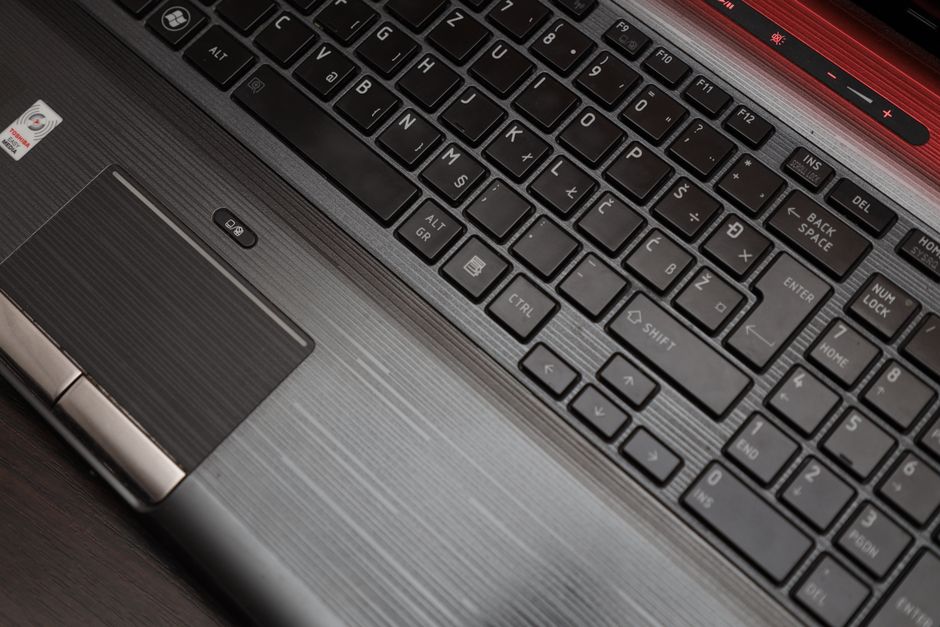
The Adesso SlimTouch keyboard, a recent entrant into the crowded ergonomic keyboard market, distinguishes itself with a striking combination of a generously sized and highly responsive touchpad integrated directly into its chassis and a decidedly unconventional, "loopy" key layout. This isn’t a keyboard for the faint of heart or those wedded to traditional QWERTY. Instead, it caters to a niche audience seeking a streamlined, all-in-one input solution and a potentially more intuitive typing experience, albeit one that requires a significant learning curve. The most immediate and arguably most impactful design choice is the expansive touchpad, positioned centrally beneath the keys, effectively replacing the need for a separate mouse for many common computing tasks. This integrated touchpad isn’t a token gesture; it’s a full-fledged pointing device, boasting multi-touch gesture support that aims to rival the functionality of its standalone counterparts.
This integrated touchpad is the cornerstone of the SlimTouch’s appeal, especially for users prioritizing desk space and portability. Its sheer size is immediately apparent, offering ample room for cursor movement and gesture execution. Adesso has clearly invested in ensuring this touchpad delivers a premium feel. The surface is smooth, facilitating effortless gliding, and the tactile feedback is precise, registering taps and swipes with commendable accuracy. Crucially, it supports a range of multi-touch gestures, mirroring the intuitive controls found on modern laptops. Swiping with two fingers to scroll vertically or horizontally, pinching to zoom, and three-finger swipes for task switching are all implemented with a responsiveness that belies its integrated nature. For users accustomed to the gesture-based navigation of smartphones and tablets, this feature makes the transition to a desktop or laptop environment significantly smoother. The absence of a separate mouse frees up considerable desk real estate, making it an attractive option for small workspaces, travel setups, or even minimalist aesthetics. The learning curve associated with the touchpad is generally less steep than the keyboard layout itself, as most users are already familiar with basic touchpad functionality. However, mastering the full suite of gestures for optimal productivity will naturally require some practice. The responsiveness and precision of the touchpad are key selling points, and Adesso appears to have delivered a robust and capable input device here, integrated seamlessly into the keyboard itself.
The "loopy" layout of the Adesso SlimTouch keyboard is where the real departure from convention occurs, and it’s this aspect that will undoubtedly polarize users. Instead of the standard, straight rows of keys, Adesso has opted for a more organic, curved arrangement. This design is inspired by the natural curvature of a typist’s fingers when resting on a keyboard, aiming to reduce finger travel and promote a more ergonomic typing posture. The keys are not just arranged in arcs; they are also slightly staggered in a way that complements the finger’s natural movement. This "loopy" design means that immediately reaching for keys like ‘Q’, ‘A’, or ‘Z’ will feel alien to anyone trained on a traditional QWERTY layout. The central keys, such as ‘F’, ‘G’, ‘H’, and ‘J’, will likely feel the most familiar, as their position is less dramatically altered. However, venturing outwards, even into common letters like ‘E’, ‘R’, ‘T’, ‘Y’, will require conscious effort and retraining. Adesso’s rationale behind this layout is rooted in ergonomics, suggesting that the curved arrangement minimizes unnecessary stretching and awkward hand positions. The theory is that over time, this can lead to reduced strain and increased typing speed for those who adapt.
The ergonomic benefits of such a "loopy" layout are theoretically significant. Traditional straight-line keyboard layouts, while universally adopted, can force fingers to deviate from their natural resting arcs. This can lead to increased tension in the wrists, forearms, and even shoulders over prolonged typing sessions. The curved design of the SlimTouch keyboard aims to counteract this by aligning the key positions with the natural sweep of the fingers. Imagine your hand resting comfortably, fingers slightly curled. The keys are then positioned to fall naturally beneath these curled fingertips, reducing the need to extend or contort your fingers to reach individual keys. This reduced finger travel, in theory, translates to less muscular exertion and a more relaxed typing experience. Furthermore, the specific curvature might also encourage a more neutral wrist posture, minimizing ulnar deviation – the outward bending of the wrist – which is a common contributing factor to repetitive strain injuries. However, it’s critical to reiterate that these benefits are contingent upon adaptation. A user completely unaccustomed to this layout will initially experience a drastic drop in typing speed and a surge in frustration. The brain needs to create new neural pathways and muscle memory to navigate this unfamiliar topography.
The adoption of the SlimTouch keyboard, particularly due to its loopy layout, necessitates a commitment to learning and retraining. This is not a plug-and-play device for the uninitiated. The learning curve is steep and will likely involve initial periods of significantly slower typing speeds and frequent errors. For individuals whose livelihood depends on fast and accurate typing, such as writers, coders, or data entry professionals, a gradual transition might be advisable. Adesso could potentially offer software or online resources to aid in this retraining process, such as custom typing tutors or layout visualizations. The key to successfully embracing this layout lies in consistent practice. Short, frequent practice sessions are often more effective than long, infrequent ones when it comes to retraining muscle memory. Users might consider dedicating specific times of the day solely to typing on the SlimTouch, allowing their fingers and brain to adapt without the pressure of immediate productivity demands. The long-term benefits, such as reduced strain and potentially improved typing efficiency once mastery is achieved, are the rewards for this initial investment of time and effort.
Beyond the central touchpad and the loopy layout, other aspects of the Adesso SlimTouch keyboard contribute to its overall functionality and user experience. The keycaps themselves often feature a low-profile design, further contributing to the slim aesthetic and potentially enhancing the typing feel by reducing key travel. The tactile feedback of the keys is another important consideration. While Adesso may not specify the exact switch type, the aim is generally to provide a satisfying and responsive typing experience without being overly loud or requiring excessive force. The build quality of the keyboard is also crucial. A keyboard with an integrated touchpad needs to be robust, as the entire unit will likely experience more handling and movement, especially if portability is a factor. Materials used, the rigidity of the chassis, and the durability of the touchpad surface all contribute to the longevity and overall perceived value of the product. Furthermore, connectivity options are essential. Most modern keyboards offer both wired USB and wireless Bluetooth connectivity. The SlimTouch likely supports both, offering users flexibility in how they connect to their devices. For a device emphasizing a streamlined experience, reliable wireless connectivity would be a significant advantage, reducing cable clutter and enhancing its appeal for portable use.
The integration of a high-quality touchpad alongside a unique keyboard layout presents a compelling value proposition for specific user segments. Professionals who frequently work in environments where space is at a premium, such as cramped offices, airplane trays, or small co-working spaces, will find the all-in-one design incredibly beneficial. Similarly, users who travel extensively and wish to minimize the number of peripherals they carry will appreciate the consolidation of keyboard and mouse functionality into a single device. The SlimTouch also appeals to tech enthusiasts and early adopters who are open to exploring new ergonomic solutions and are willing to invest the time in learning a different input method. The potential for reduced typing-related discomfort and the unique aesthetic of the loopy layout can be strong motivators for these individuals. Adesso’s marketing efforts will likely target these niches, highlighting the space-saving advantages, the advanced touchpad features, and the ergonomic promises of the unconventional key arrangement.
The marketing and SEO strategy for the Adesso SlimTouch keyboard should capitalize on its unique selling propositions while addressing the potential concerns of users. Keywords such as "ergonomic keyboard," "integrated touchpad keyboard," "wireless keyboard with touchpad," "compact keyboard," "travel keyboard," and "unique keyboard layout" will be crucial for attracting relevant search traffic. Content should clearly explain the benefits of the loopy layout, focusing on reduced finger travel and potential long-term comfort, while also acknowledging the learning curve. High-quality product images and videos showcasing the touchpad gestures and the curvature of the keys will be essential for demonstrating the product’s features. Customer testimonials from users who have successfully adapted to the layout and experienced its benefits would further enhance credibility and encourage adoption. Comparisons to traditional keyboards, highlighting the space-saving and integrated functionality, will also be valuable. For SEO purposes, technical details such as connectivity options (Bluetooth, USB), battery life (if wireless), and dimensions should be readily available and optimized.
In conclusion, the Adesso SlimTouch keyboard represents a bold departure from conventional input device design. Its terrifically integrated touchpad offers a robust and intuitive pointing experience, while its loopy key layout, though demanding a significant learning commitment, promises potential ergonomic advantages and a unique typing feel. This keyboard is not a mass-market appliance; it is a specialized tool designed for users who prioritize space efficiency, are open to retraining their typing habits, and are seeking innovative ergonomic solutions. The success of the SlimTouch will ultimately depend on its ability to deliver on its promises of comfort and functionality to its target audience, and for those willing to embrace its distinctive approach, it offers a compelling glimpse into the future of keyboard design. The combination of a large, responsive touchpad and a radically different key layout creates a product that is both intriguing and potentially revolutionary for the right user.













No comments yet. Be the first to join the conversation!