Htc Gives Sense Ui A Facelift In New Desire Phones
HTC Gives Sense UI a Facelift in New Desire Phones
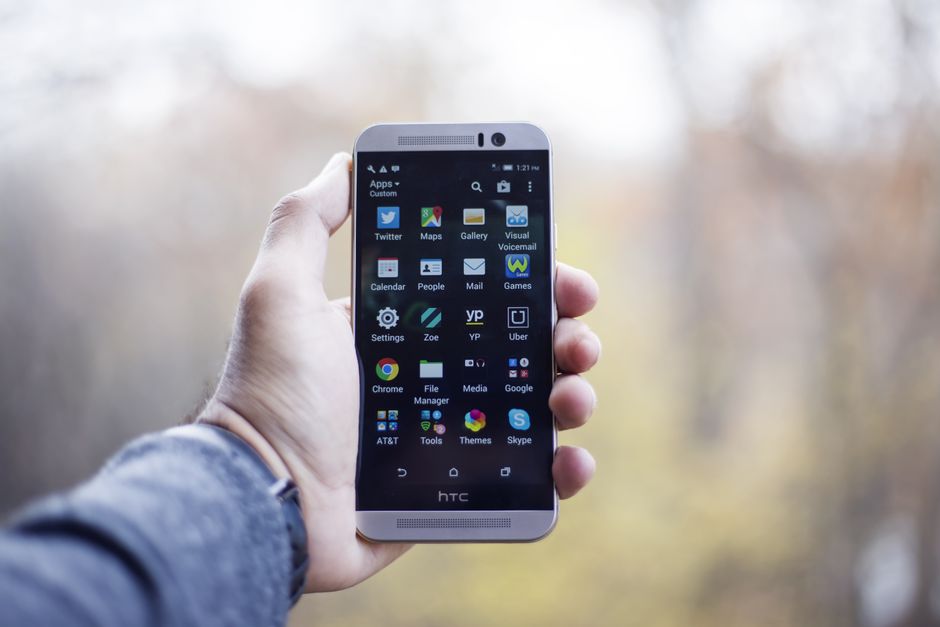
HTC’s persistent commitment to refining its Sense User Interface (UI) is once again evident with the unveiling of its latest Desire smartphones. This isn’t a superficial cosmetic update; it’s a carefully considered evolution aimed at streamlining user experience, enhancing visual appeal, and introducing smart functionalities that align with modern mobile usage patterns. The Desire line, historically positioned as HTC’s accessible yet feature-rich offering, now benefits from a revitalized Sense UI that promises to be more intuitive, personalized, and visually cohesive. This facelift addresses key areas of user interaction, from home screen customization and app management to camera integration and notification handling, aiming to create a more fluid and enjoyable smartphone journey.
The most striking element of the Sense UI facelift is its redesigned visual language. HTC has moved towards a cleaner, flatter aesthetic, reducing the reliance on skeuomorphic elements that characterized earlier versions. This means less imitation of real-world objects and a greater emphasis on clear, legible typography, subtle animations, and a more harmonious color palette. The goal is to reduce visual clutter and allow users to focus on content rather than the interface itself. Icons have been subtly refined, adopting a more uniform style across the system and third-party applications where possible through better developer integration. This uniformity contributes to a sense of order and professionalism. Furthermore, the introduction of new theme options and dynamic wallpapers allows for deeper personalization without compromising the overall visual integrity of the UI. Users can now more easily tailor their device’s look to their personal preferences, choosing from a wider array of color schemes, font styles, and icon packs. This focus on aesthetics is not just about looking good; it’s about creating an environment that feels welcoming and engaging for extended periods of use.
Beyond the surface-level visual changes, HTC has made significant strides in optimizing the core user experience with this Sense UI update. The home screen, long a cornerstone of Sense’s customizability, has been further enhanced. Widgets are now more interactive and can often be expanded or collapsed with simple gestures, allowing users to access more information without leaving their primary screen. The app drawer has also seen improvements, with smarter sorting options and enhanced search functionality. Finding specific applications is now quicker and more efficient, especially for users with a large number of installed apps.HTC’s "BlinkFeed" feature, a content aggregation hub, has also been integrated more seamlessly. While its core purpose remains the same – to pull in news, social media updates, and other personalized content – its presentation is now less intrusive and more contextually relevant, appearing when and how users might find it most useful. This thoughtful integration prevents it from feeling like an unwanted overlay.
A key area of improvement in the new Sense UI is its enhanced multitasking and notification management. The recent apps screen has been redesigned to offer a more visual representation of open applications, with larger thumbnails and smoother transitions. Users can now clear all open apps with a single gesture, a small but significant improvement in efficiency. Notification handling has also been made more intelligent. Instead of a constant barrage of alerts, Sense UI now employs more sophisticated grouping and prioritization. Critical notifications are more prominent, while less urgent ones are intelligently batched, reducing interruptions. Users have greater control over which apps can send which types of notifications, further empowering them to curate their digital environment. The quick settings panel, accessible by swiping down from the top of the screen, has also been streamlined, with more customizable toggles and a clearer layout, ensuring that frequently used functions are always within easy reach.
The camera experience, a crucial component of any smartphone, has also been given a significant boost through the Sense UI integration. The camera app itself has been redesigned with a cleaner interface, making it easier to access various shooting modes, filters, and settings. HTC has focused on simplifying the shooting process while still offering advanced controls for photography enthusiasts. The integration of AI-powered scene recognition has been enhanced, allowing the camera to automatically adjust settings for optimal results based on the environment. Furthermore, features like Night Mode and portrait enhancements are now more accessible and deliver superior image quality thanks to the tighter integration with the underlying hardware and software processing capabilities of the new Desire phones. The ability to quickly access and share photos directly from the camera interface, with subtle edits and filters applied on the fly, showcases the fluidity that HTC has strived to achieve with this update.
Under the hood, the Sense UI facelift in the new Desire phones also emphasizes performance and battery optimization. While specific hardware specifications vary across the Desire lineup, the software has been tuned to leverage the processing power efficiently. Resource management has been improved, ensuring that background processes are handled intelligently to prevent slowdowns and conserve battery life. This means smoother app launches, more responsive navigation, and a generally snappier user experience. HTC has also implemented smarter power-saving modes that can be customized to individual user habits, further extending battery longevity. This focus on efficiency is crucial for users who rely heavily on their smartphones throughout the day. The underlying operating system updates are also tightly integrated, ensuring that the latest security patches and performance enhancements are delivered consistently.
Personalization, a hallmark of HTC Sense UI, has been elevated in this latest iteration. Beyond visual theming, the UI now offers more intelligent ways for users to personalize their workflow. Contextual shortcuts can be created, allowing specific apps or actions to appear based on location, time of day, or connected accessories. For example, a work-related app might automatically appear on the home screen when the user arrives at their office. Similarly, music controls could become more prominent when headphones are connected. This proactive personalization aims to anticipate user needs and reduce the cognitive load of navigating through menus and app drawers. The integration of HTC’s proprietary features, such as "UFocus" for post-capture focus adjustments in photography, has also been made more user-friendly within the updated Sense UI, further enhancing the creative potential for users.
The integration of AI and smart assistants is another area where the new Sense UI shines. HTC has deepened its integration with Google Assistant, making it more accessible and responsive through voice commands and dedicated shortcuts. The UI can now surface relevant information from Google Assistant more proactively, offering suggestions and answering questions without requiring the user to explicitly invoke the assistant. This seamless integration makes the smartphone feel more like an intelligent companion rather than just a tool. The AI capabilities also extend to other aspects of the UI, such as learning user habits and preferences to optimize app suggestions and notification delivery, creating a truly personalized and predictive experience.
The security and privacy aspects of the Sense UI have also been addressed. While not always the most visibly prominent aspect of a UI facelift, HTC has reinforced its commitment to user data protection. The UI now offers clearer controls over app permissions, allowing users to understand exactly what data each app can access and to revoke permissions with ease. Biometric authentication methods, such as fingerprint scanning and facial recognition, are now more seamlessly integrated into the login and unlocking processes, providing both convenience and enhanced security. Regular security updates are delivered through the Sense UI framework, ensuring that the devices remain protected against emerging threats.
In conclusion, HTC’s latest Sense UI facelift on its new Desire phones represents a significant evolution. It’s a holistic approach that blends a refreshed visual aesthetic with a deeper focus on user experience, personalization, and intelligent functionality. By streamlining interactions, enhancing customization options, and leveraging AI, HTC is aiming to deliver a smartphone experience that is not only visually appealing but also exceptionally intuitive and efficient. The renewed emphasis on core functionalities like camera and notification management, coupled with a commitment to performance and security, positions the new Desire phones and their Sense UI as a compelling choice for users seeking a refined and capable mobile device. The iterative yet substantial improvements demonstrate HTC’s dedication to refining its software offering and staying competitive in the ever-evolving smartphone landscape, making the Sense UI more than just an interface, but an integral part of the user’s digital life.