Why Apps Are Better On Windows Phone 7
The Unsung Powerhouse: Why Windows Phone 7 Apps Reign Supreme for the Discerning User
Windows Phone 7, a platform often overshadowed by its more commercially successful rivals, possesses a distinct advantage in its application ecosystem, particularly when viewed through the lens of user experience, integration, and forward-thinking design principles. While sheer app quantity might be a point of contention for some, the quality and purposefulness of the apps available on Windows Phone 7, coupled with the inherent strengths of the operating system, create a compelling case for its superiority in specific areas. This article will delve into the core reasons why apps on Windows Phone 7 are not just comparable, but in many instances, demonstrably better for a segment of users who value efficiency, seamless integration, and a focused mobile computing experience.
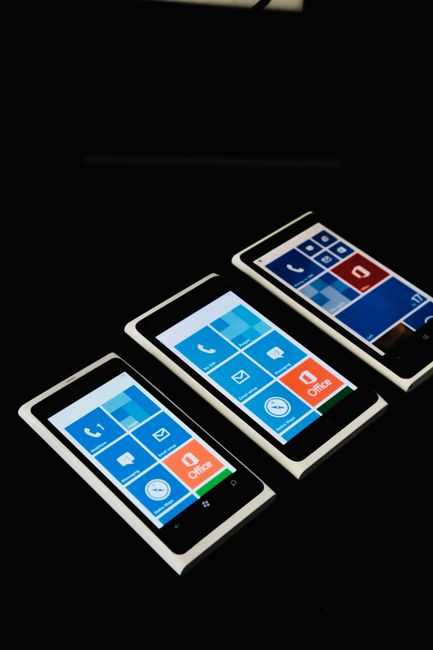
One of the most significant differentiators of Windows Phone 7’s app strategy was its unwavering commitment to a cohesive and intuitive user interface. Unlike the often fragmented and visually disparate nature of apps on other platforms, Windows Phone 7 apps were designed with the Metro design language at their core. This meant a consistent visual experience, characterized by clean typography, live tiles, and a clear hierarchy of information. For the end-user, this translates directly into a faster learning curve and reduced cognitive load when navigating between different applications. Developers were encouraged, and in many cases, required, to adhere to these design guidelines, resulting in an app landscape where functionality was not sacrificed for novelty, and usability was paramount. This standardization meant that learning how to use one app often provided a foundational understanding of how to use many others, fostering a sense of familiarity and control that was often absent on competing platforms where every app developer seemed to invent their own UI paradigms. The live tile system itself was a revolutionary approach to app information delivery, offering at-a-glance updates without the need to open an application. This proactive information display meant that users could stay informed about emails, appointments, social media updates, and news without constantly polling individual apps, a level of efficiency that has only recently begun to be emulated by other operating systems.
Furthermore, the tight integration of Windows Phone 7 with Microsoft’s existing ecosystem provided a distinct advantage for apps that leveraged these connections. For users already invested in services like Office 365, SkyDrive (now OneDrive), and Xbox Live, the native integration of apps that interfaced with these platforms was seamless and powerful. Document editing apps, for instance, could directly save and access files from SkyDrive, eliminating the need for cumbersome cloud sync workarounds. Similarly, games and entertainment apps could seamlessly integrate with Xbox Live profiles, offering a unified gaming experience across devices. This deep integration was not merely a superficial feature; it was foundational to the Windows Phone 7 experience, allowing for a fluidity of workflow that was difficult to replicate elsewhere. Imagine drafting an email in Outlook, attaching a document stored on SkyDrive, and then scheduling a meeting directly from the email – all within a cohesive and interconnected environment. This level of productivity was a hallmark of the Windows Phone 7 app experience for those who utilized Microsoft’s broader product suite. The operating system’s architecture was built with these integrations in mind, allowing for efficient data sharing and a reduced overhead for developers looking to tap into these powerful services.
The focus on quality over quantity in the Windows Phone 7 app store was another crucial factor contributing to the platform’s app superiority for a certain demographic. While other platforms might boast hundreds of thousands of apps, a significant portion of these are often low-quality, redundant, or even malicious. Windows Phone 7, particularly in its early iterations, had a more curated app store. Developers had to meet higher standards for performance, security, and adherence to design principles. This meant that users were less likely to encounter buggy or poorly designed applications. The result was a more reliable and enjoyable app experience. This curated approach also fostered a stronger sense of trust in the available applications. Users could be more confident that an app downloaded from the Windows Phone 7 marketplace would perform as advertised and would not pose a security risk. This emphasis on a polished and dependable app ecosystem directly translated into a superior user experience, where the core functionality of an app was more likely to be delivered without frustration.
Performance and resource management were also areas where Windows Phone 7 apps often excelled. The operating system was designed from the ground up to be efficient and responsive, even on less powerful hardware. This efficiency translated into apps that were generally faster, smoother, and less prone to battery drain. Developers building for Windows Phone 7 benefited from a more predictable and optimized environment, allowing them to create applications that performed exceptionally well without requiring cutting-edge specifications. This meant that users could enjoy a high-quality app experience even on mid-range devices, a stark contrast to platforms where the latest hardware was often a prerequisite for a smooth app experience. The underlying architecture of Windows Phone 7 was built with a focus on resource optimization, allowing for a more efficient allocation of CPU and memory, which in turn led to faster app loading times and a more fluid overall user interface. This performance advantage was particularly noticeable in demanding applications like games and multimedia players, where stuttering and lag could significantly detract from the user experience.
Moreover, the development tools and philosophy behind Windows Phone 7 encouraged a focus on robust and well-structured applications. The use of Silverlight and XNA for development, while requiring a different skillset, often led to applications with a higher degree of polish and stability. These frameworks provided developers with powerful tools for creating visually rich and interactive experiences, and the emphasis on structured development often resulted in fewer bugs and a more reliable application. This was not about simply porting existing applications; it was about building applications that were specifically designed for the Windows Phone 7 platform, taking advantage of its unique capabilities and design principles. This native development approach contributed to a more integrated and performant app ecosystem, where applications felt like they were truly a part of the operating system, rather than an afterthought.
Security was another significant consideration that benefited the app experience on Windows Phone 7. Microsoft’s approach to app security was generally more stringent compared to some of its competitors. The Windows Phone 7 marketplace had a robust review process that aimed to weed out malicious or privacy-invasive applications. This focus on security provided users with greater peace of mind when downloading and using apps. In an era where data privacy is of paramount importance, the security-conscious approach of Windows Phone 7 was a clear advantage for its app ecosystem. Users could browse and download applications with a higher degree of confidence, knowing that there was a system in place to vet them for potential security risks. This proactive security posture contributed to a more trustworthy and dependable app environment.
The emphasis on a focused and less distracting user experience on Windows Phone 7 also indirectly benefited its apps. The Metro design language, with its emphasis on clear typography and minimalist interfaces, helped users to concentrate on the task at hand within an application. There was less visual clutter and fewer intrusive notifications that could pull users away from their intended activity. This focused design philosophy meant that apps on Windows Phone 7 were often more productive and less prone to causing user fatigue. The absence of the constant barrage of pop-ups and overlays that plague some other mobile operating systems allowed users to engage with their applications more deeply and efficiently.
Finally, the forward-thinking nature of Windows Phone 7’s app strategy, particularly its pioneering use of live tiles and deep system integration, laid the groundwork for many features that have since become standard on other platforms. While Windows Phone 7 may not have achieved mass market dominance, its influence on the evolution of mobile app design and functionality is undeniable. The apps on Windows Phone 7 were not just tools; they were an integral part of a thoughtfully designed mobile computing experience, offering a level of integration, quality, and focus that remains a benchmark for users who prioritize efficiency and a cohesive digital life. For those who appreciated a streamlined, efficient, and deeply integrated mobile experience, the apps on Windows Phone 7 offered a demonstrably superior environment, even if the platform itself eventually receded from the spotlight. The legacy of its app design principles continues to resonate in the modern mobile landscape.